Resilient, observable agents with Restate and Arize Phoenix
Giselle van Dongen, Aaron Winston (Arize)
Agents are moving from single-turn LLM calls to long-running workflows. Instead of answering one prompt in a few seconds, they now plan multi-step tasks, call tools across external APIs and MCP servers, hand work off to sub-agents, and run for minutes, hours, or days with limited human input.
But long-running agents also fail differently than simple LLM calls. A timeout can happen after several successful tool calls. A redeploy can interrupt a workflow halfway through. A retry can accidentally duplicate a side effect. And when the final output looks wrong, you need enough context to understand whether the issue came from the prompt, model, tool, input, or execution state.
That creates two requirements for production agents: durable execution, so work can resume safely after failures, and observability, so developers can inspect what happened and improve the next version.
In this post, we'll show you how Restate and Arize Phoenix address those requirements together. Restate makes the workflow durable, so long-running agents can recover from crashes, retries, redeploys, and transient API failures without starting over. Phoenix makes the workflow inspectable and measurable, so you can see every LLM call, tool invocation, cost, latency, and evaluation result in context.
Together, they give you a practical loop for building reliable agents: execute durably, trace every step, evaluate outputs, annotate failures, and use those signals to improve the next version. We'll walk you through how this works and how to set it up, using a running example (GitHub source).
Building a resilient agent with Restate
Imagine an insurance claim agent that parses a claim document, analyzes it, converts currency, and reimburses the claim. If something fails halfway through, you want it to retry and pick up where it left off.
Restate enables this by making every non-deterministic step durable. LLM calls, API calls, MCP calls, and tool interactions are recorded in a journal, allowing failed executions to be replayed and resumed safely.
Here's the agentic workflow using Restate’s OpenAI Agent integration:
@claim_service.handler()
async def run(ctx: restate.Context, req: ClaimDocument) -> str:
  # Step 1: Parse the claim document (Agentic step)
  parsed = await DurableRunner.run(parse_agent, req.text)
  claim: ClaimData = parsed.final_output

  # Step 2: Analyze the claim (Agentic step)
  response = await DurableRunner.run(analysis_agent, claim.model_dump_json())
  assessment: ClaimAssessment = response.final_output

  if not assessment.valid:
      return "Claim rejected"

  # Step 3: Convert currency (durable step, no LLM)
  converted = await ctx.run_typed("Convert", convert_currency, amount=claim.amount)

  # Step 4: Process reimbursement (durable step, no LLM)
  await ctx.run_typed("Reimburse", reimburse, amount=converted)

  return "Claim reimbursed"
The agentic steps run through DurableRunner, while other workflow steps are wrapped in ctx.run for retries and result persistence. The result is a workflow that can recover from failures at any point without losing progress, even for fine-grained steps within agent tools.
Tracing the agent workflow in Arize Phoenix
Durable execution keeps the workflow running, but you still need to understand what happened inside each run. If a claim gets rejected unexpectedly or a reimbursement amount looks wrong, the trace needs to show the LLM calls, tool calls, workflow steps, inputs, outputs, latency, token usage, and cost in one place.
Phoenix captures that context as traces, giving teams a structured view of agent behavior across both AI-specific steps and the surrounding workflow.
This includes recording each LLM call with prompts, tool invocations, model configurations, token usage, latency, and cost — all in a single trace, alongside the regular workflow steps that Restate orchestrates.
Enabling it takes a few lines in __main__.py:
from phoenix.otel import register
from opentelemetry import trace as trace_api
from openinference.instrumentation import OITracer, TraceConfig
from openinference.instrumentation.openai_agents._processor import (
  OpenInferenceTracingProcessor,
)
from agents import set_trace_processors
from restate.ext.tracing import RestateTracerProvider

# Initialize Arize Phoenix (sets up the global OTEL tracer provider + exporter).
register()
tracer = OITracer(
  RestateTracerProvider(trace_api.get_tracer_provider()).get_tracer(
      "openinference.openai_agents"
  ),
  config=TraceConfig(),
)
set_trace_processors([OpenInferenceTracingProcessor(tracer)])
Restate manages the parent span and exports workflow steps as OpenTelemetry traces. Phoenix adds the AI-specific spans and metadata using OpenInference semantic conventions.
The result is a single trace that covers everything from request intake to final reimbursement, with LLM calls, tool calls, and durable steps all shown side by side:
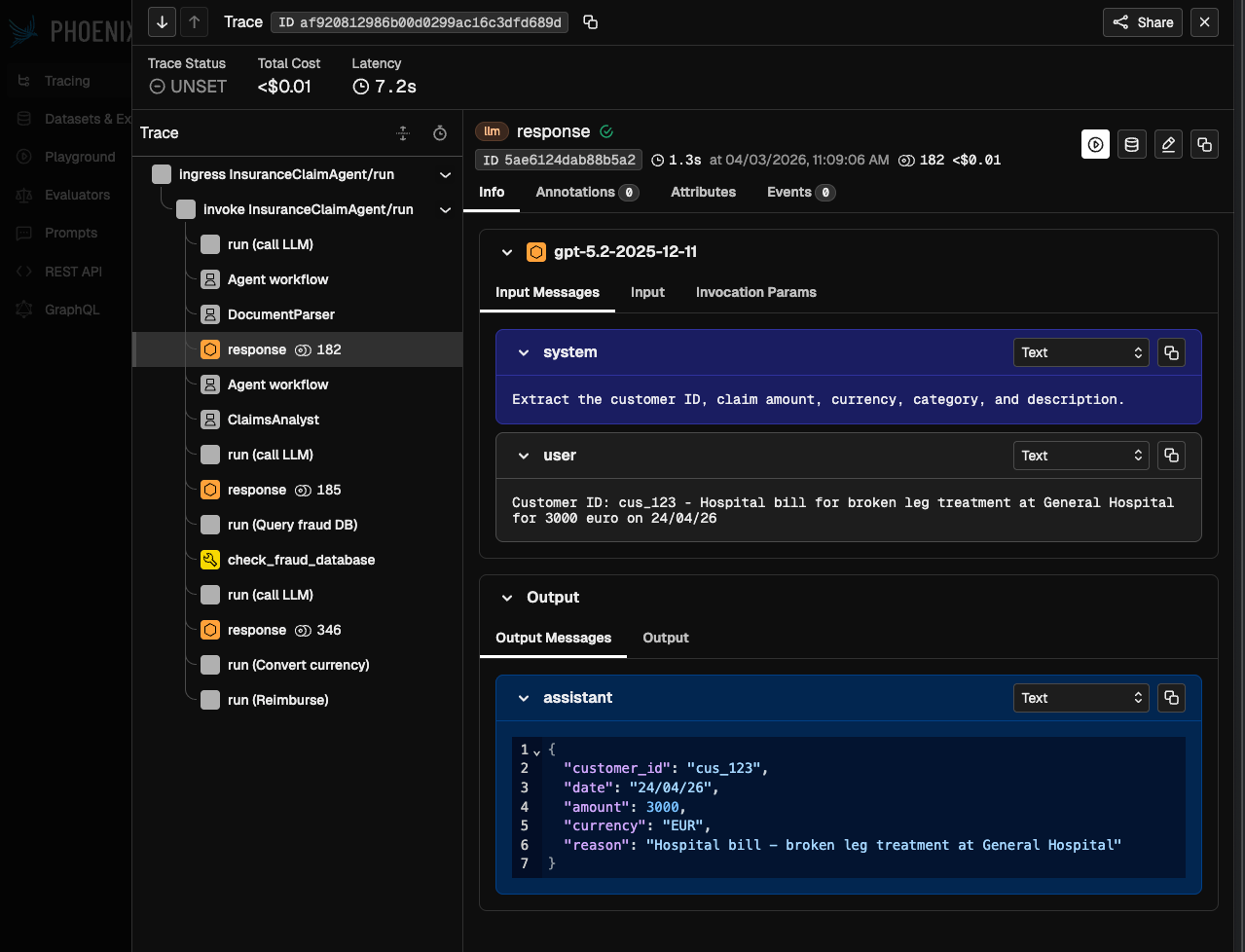
You don't need to change your agent code to get this. The instrumentation lives entirely in the entry point.
From traces to agent quality
Traces are not just useful for debugging — they are also the foundation for improving your agents: iterating on prompts, comparing agent versions to catch regressions, and running evaluations to surface quality issues before users hit them.
Version-pinned traces to attribute agent behavior
For traces to be meaningful, they must be tied to the exact context in which they were generated: the agent version, prompt version, tool definitions, and execution history.
Restate's versioning model guarantees this by ensuring that each execution runs on a fixed version of the code. When you deploy a new version of your agent, Restate routes new requests to the latest version, while ongoing executions always continue on the version they started with, including retries and resumptions.
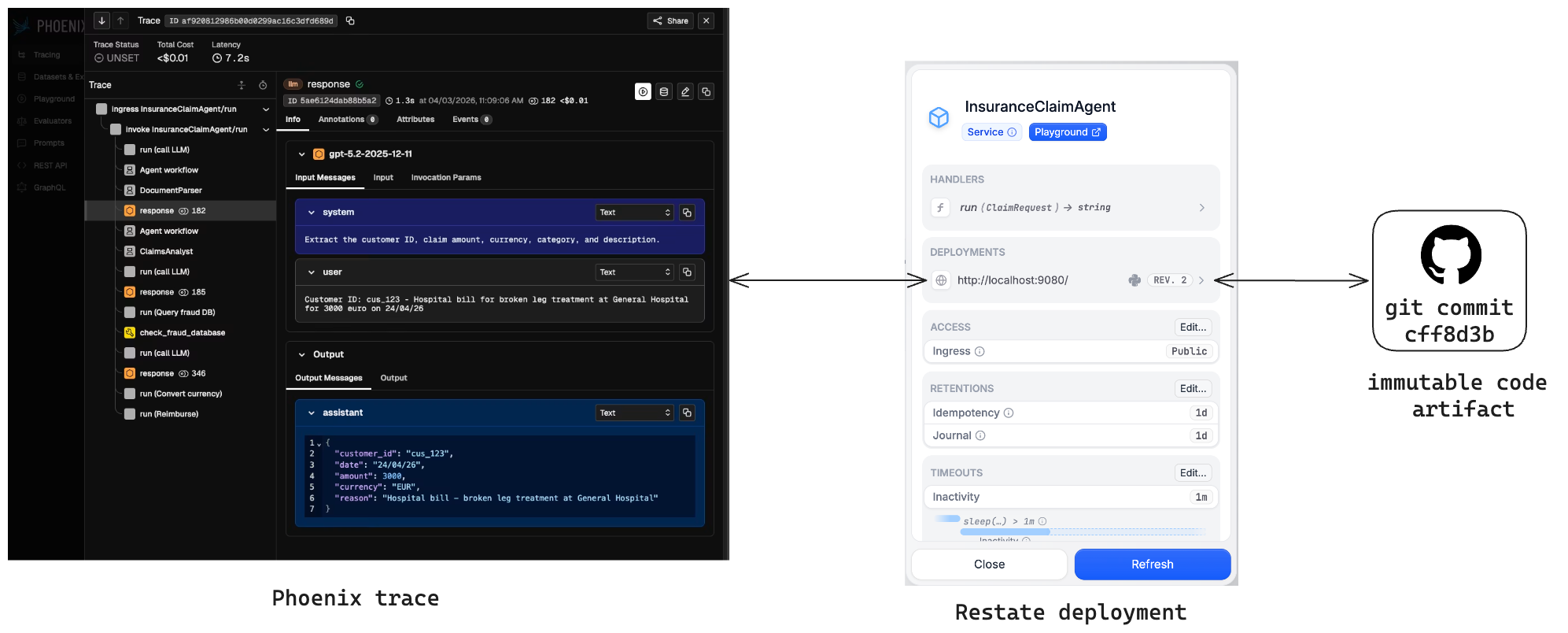
This makes each Phoenix trace attributable to the version of the agent that produced it. When behavior changes, you can compare traces across versions, identify regressions, and decide whether to keep iterating or roll back.
Async evals that don’t block your agent
With traces tied to agent versions, teams can evaluate outputs automatically and track quality over time. Phoenix supports LLM-as-a-Judge evaluations that score traces on dimensions like correctness, hallucination, or relevance.
For production agents, those evals should not slow down the user-facing workflow. A common pattern is to complete the agent run, then start a background evaluation that scores the output and writes the result back to the original trace. Restate acts as both the queue and the orchestrator that drives the eval to completion:
ctx.service_send(
   evaluate,
   arg=EvaluationRequest(traceparent=ctx.request().attempt_headers.get("traceparent")),
   input=claim.model_dump_json(),
   output=assessment.model_dump_json(),
))
The evaluation workflow runs the judge and writes the score back to the original claim trace as a Phoenix annotation, so the eval result stays connected to the run that produced it:
@evaluation_service.handler()
async def evaluate(ctx: restate.Context, req: EvaluationRequest):
  # Step 1: Run the LLM judge (durable — retried on failure)
  result = await DurableRunner.run(
      judge_agent,
      f"Evaluate this insurance claim processing:"
      f"Claim Input: {req.input}"
      f"Agent Output: {req.output}",
  )
  evaluation: EvaluationScore = result.final_output

  # Step 2: Annotate the original trace in Phoenix
  async def annotate_trace() -> None:
      px_client.spans.add_span_annotation(
          span_id=req.span_id(),
          annotation_name="quality",
          label=evaluation.label,
          score=evaluation.score,
          explanation=evaluation.reason,
      )

  await ctx.run_typed("Annotate trace in Phoenix", annotate_trace)
Because the judge itself is just another Restate handler, it gets the same guarantees as the agent: durable execution, retries on transient failures, and full visibility in Phoenix.
Running the example
The full code is available on GitHub. Have a look at the Arize Phoenix integration docs to swap the OpenAI Agents SDK for any other framework and for instructions on how to run it locally.
What about TypeScript?
If your agents are written in TypeScript, the same pattern works. Point Restate's tracing endpoint at Phoenix, set up @arizeai/phoenix-otel in your service, and add a Restate service hook that wraps each handler and ctx.run in an OpenInference span.
Start building resilient agents
By combining Restate and Arize Phoenix, you can build agents that recover from failures, preserve execution context, and produce traces that are useful for debugging, evaluation, and iteration.
Get started with a fully serverless setup with Restate Cloud, Phoenix Cloud, and your favorite serverless platform to run your agents.
Both Restate and Phoenix are open source and available on GitHub (Restate / Phoenix). You can run the example locally, inspect the traces in Phoenix, and use the same pattern to add durable execution and evals to your own agent workflows. Oh, and you can ask any questions on Discord or Slack.
Keep reading
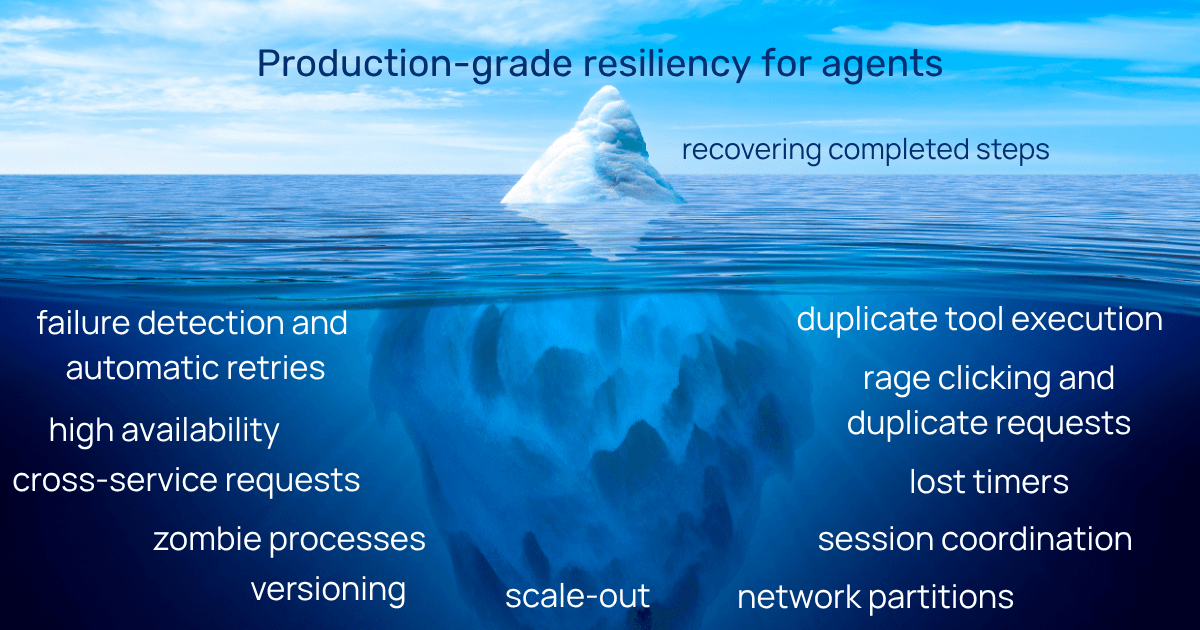
Agent checkpointing is far from production-grade resiliency
Checkpointing helps with recovery, but agents are distributed applications and making them durable requires more than that.
Resilient, observable agents with Restate and Langfuse
Combine Restate and Langfuse for agent reliability, observability, and quality control in one stack.
Durable Orchestration with Pydantic AI Agents and Restate
Bring enterprise-grade durability to your AI agents with Restate and Pydantic AI.